Figmentor 4.0 is now live, the most accurate Figma to Elementor plugin, Discover the new plugin →
The #1 Figma → Elementor Plugin

Convert Figma Designs Into Elementor Templates Instantly

The #1 plugin that transforms Figma frames into fully importable Elementor JSON files with pixel-perfect accuracy and SEO optimization.


Avatar
Avatar
Avatar
3,000+ designers already saving hours weekly
Trusted by teams using
Figma
WordPress
Elementor
How it works

Three steps. Zero manual
coding required.

From Figma frame to live WordPress page faster than you can brew a coffee.

01
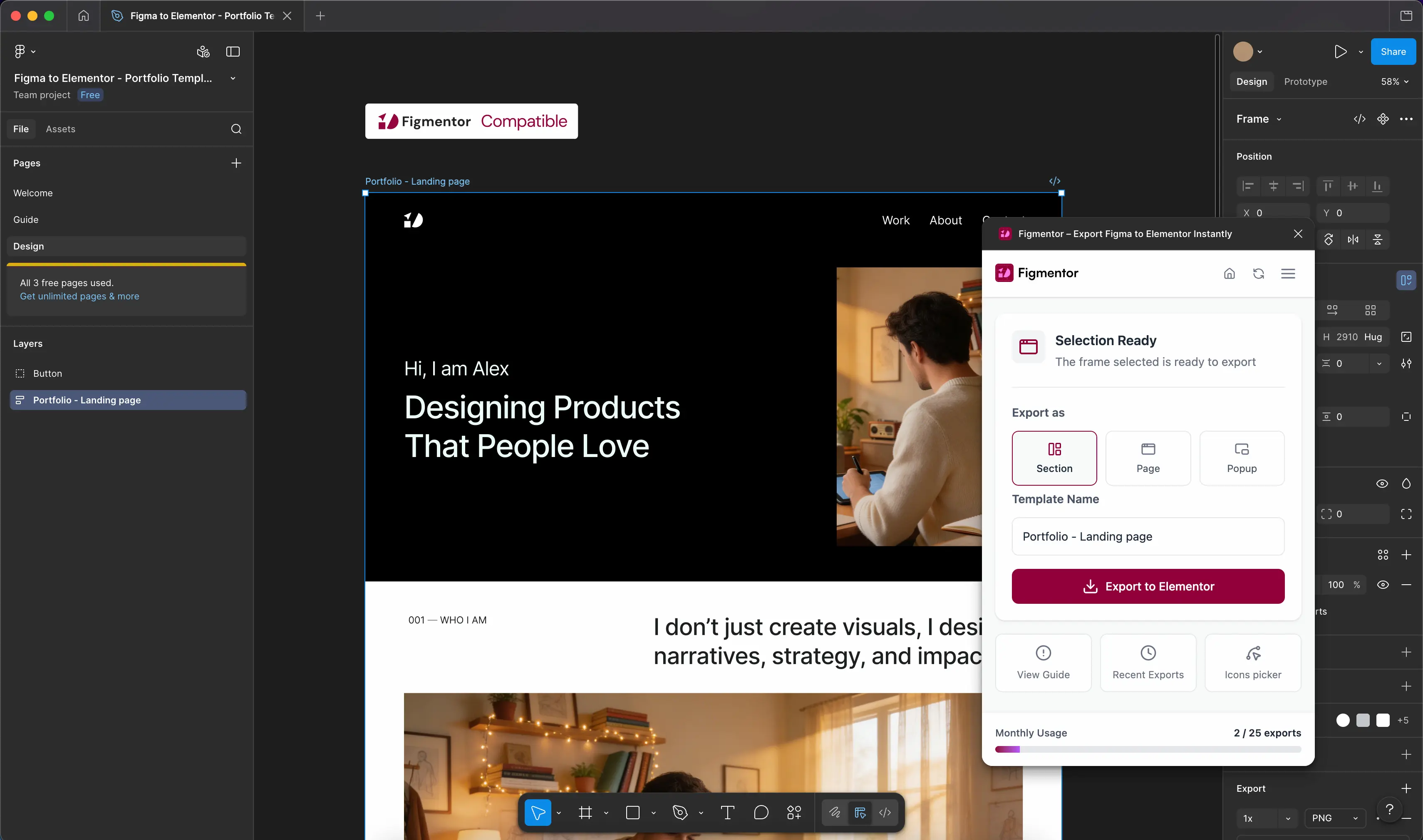
Select your Figma frame

Open Figmentor from the Figma plugin panel. Select any frame, component, or page you want to convert from hero sections to full page layouts.

02
Generate Elementor JSON

Click "Convert." Our engine parses your Figma layers, maps every element to native Elementor widgets, and generates a clean, optimized JSON file in seconds.

03
Import to WordPress

Drop the JSON into Elementor's template importer. Your pixel-perfect design appears instantly fully editable, responsive, and ready to publish.

Features

Everything you need to
ship faster

Figmentor is built specifically for designers and WordPress developers who care about output quality, SEO, and time-to-publish.

One-Click Figma Export

Convert entire Figma frames into Elementor templates with a single click. Save hours of tedious manual development work per project.

SEO-Optimized Output

Clean, semantic HTML structure baked into every exported template. Proper heading hierarchy, alt attributes, and schema-ready markup out of the box.

Complete Widget Support

Full compatibility with Elementor's widget library columns, sections, text, images, buttons, icons, and responsive structure all preserved.

Figma Layer Preservation

Your original Figma layer names and structure are preserved in the Elementor output, making post-import editing fast and intuitive.

Regular Updates

Figma and Elementor ship updates constantly. We stay ahead so your conversions always work new widgets, new APIs, zero surprises.

Priority Support

Direct access to our team for any conversion questions or edge-case designs. Pro and Team plans get dedicated agents and fast response times.

Why Figmentor

The only tool built for this exact
workflow

Capability
Manual
Others
Figmentor
Figma to Elementor conversion
Manual hours
Partial
One click
SEO-optimized HTML structure
Full Elementor widget support
Varies
Limited
Complete
Figma layer name preservation
Pixel-perfect accuracy
Depends
~70%
98%+
Time per conversion
2–8 hrs
30+ min
< 30 sec
Regular compatibility updates
Rarely
Continuous
Pricing

Simple, transparent
pricing

Start free. Scale as your workflow grows. Cancel anytime, no questions asked.

Starter
$9 /month

Billed monthly. Switch to yearly to save.

Perfect for freelancers and personal projects.
  • 25 exports per month
  • 1 seat included
  • Basic widget compatibility
  • Community forum support
  • Premium widgets
Get started
Team
$49 /month

Billed monthly. Switch to yearly to save.

For agencies and teams delivering multiple WordPress sites at scale.
  • Unlimited exports
  • 5 team members
  • Full widget compatibility
  • Dedicated support agent
  • Access to premium widgets
Get started
Testimonials

Trusted by designers &
developers worldwide

★★★★★

Figmentor has completely transformed my WordPress workflow. What used to take hours of manual coding now happens with a single click and the Elementor templates are perfectly accurate every time.

Avatar
Sarah Johnson
UI/UX Designer
★★★★★

As a developer working with Elementor daily, I appreciate how clean the JSON output is. It integrates seamlessly with WordPress projects and maintains proper semantic markup for SEO without any hand-holding.

Avatar
Michael Chen
WordPress Developer
★★★★★

Our agency has doubled our client capacity since implementing Figmentor. The conversion from Figma to Elementor is flawless, and clients love how quickly we deliver their sites.

Avatar
Diaz Rodriguez
Web Design Agency Owner
FAQ

Frequently asked
questions

Figmentor installs directly in Figma as a plugin. When you trigger a conversion, it reads your Figma frame's layer tree, maps each element to the closest Elementor widget equivalent, and generates a valid JSON file. You then import that file directly into Elementor via WordPress.
Yes. We ship regular updates to stay compatible with both Figma's API changes and Elementor's widget updates. Our continuous update cycle means you're never blocked by version mismatches.
Figmentor achieves 98%+ visual accuracy for well-structured Figma frames. Complex effects like custom blend modes or Figma-specific components may require minor tweaks post-import, but the structural fidelity is extremely high.
Most users save 2–8 hours per design section compared to manual Elementor rebuilding. For full-page layouts, entire conversion workflows that used to take a full workday now complete in under 5 minutes.
Yes, core functionality works with Elementor Free. Premium widget mappings (like Forms, Slides, and WooCommerce widgets) require Elementor Pro to render, but the base conversion is fully functional on the free tier.
Absolutely. Figmentor imports as a native Elementor template. Every widget is fully editable, responsive breakpoints are set correctly, and your Figma layer names are preserved as widget labels for easy navigation in the Elementor panel.
Any Figma file you have Editor access to. This includes personal files, team files, and drafts. Figmentor works with frames at any level of nesting from top-level pages to deeply nested components.

Stop rebuilding,
Start shipping.

Join over 3,000 designers and developers who save hours every single week with Figmentor.